

A successful healthcare website should make it easy for patients to understand who you are, what services you offer, where you are located, and how to take the next step. It should also feel trustworthy, accessible, mobile-friendly, and thoughtfully designed around the patient experience.
Your website is often one of the first interactions a prospective patient has with your organization. Before calling, scheduling, or walking through your doors, they may already be forming an opinion about your care based on what they find online.
That is why effective healthcare website design goes beyond creating something that looks polished. Your website needs to answer important questions, reduce uncertainty, and guide people toward the care they need.
Here are 10 elements every healthcare website should have.

1. A Clear Message on the Homepage
Patients should not have to search through your website to understand what your organization does.
The top of your homepage should quickly explain:
What type of healthcare organization or practice you are
Who you serve
Where you are located or which communities you serve
What action visitors should take next
For example, a pediatric dental practice might immediately identify itself as a pediatric dentist serving families in a particular town. A rehabilitation hospital may highlight the conditions it treats, its location, and its approach to recovery.
Avoid leading with broad language such as “quality care you can trust” without providing any context. Warmth is important, but clarity is what helps patients know they are in the right place.
2. Simple, Patient-Focused Navigation
Healthcare websites can contain a lot of information, but the navigation should never feel overwhelming.
Organize your website around what patients are most likely to need, such as:
Services or treatments
Providers
Locations
Insurance information
New-patient information
Appointment requests
Contact information
Use familiar labels instead of internal terminology that patients may not understand. Someone visiting your website may be stressed, in pain, or researching care for a loved one. Clear navigation makes that process feel a little easier.
3. A Fast, Mobile-Friendly Experience

Your healthcare website needs to work just as well on a phone as it does on a desktop computer.
Patients may be searching from their phones, checking directions from a parking lot, or trying to call your office quickly. Pages should load efficiently, buttons should be easy to tap, and text should be readable without zooming in.
Google also uses the mobile version of a website for indexing and ranking, making mobile performance important for both patient experience and search visibility.
Large image files, unnecessary animations, crowded layouts, and complicated menus can make a website slower and more difficult to use. A clean, responsive design helps patients find what they need without friction.
4. Clear Calls to Action
Once a visitor finds the information they need, the website should make the next step obvious.
Depending on the organization, calls to action might include:
Request an appointment
Call our office
Find a location
Refer a patient
Learn about admissions
Contact our team
Place the primary call to action in the header and repeat it naturally throughout important pages. On mobile devices, phone numbers should be clickable.
The goal is not to cover every page with buttons. It is to prevent interested patients or referral partners from reaching a dead end.
5. Detailed Provider Bios
Choosing a healthcare provider is personal. Patients want to know more than a name and job title.
A strong provider page can include:
Education and training
Board certifications
Areas of clinical interest
Languages spoken
Professional affiliations
Care philosophy
A warm, professional photograph
Credentials establish expertise, while more personal details help providers feel approachable. When appropriate, write bios in language patients can understand instead of presenting a long list of unexplained medical titles.
Provider pages can also support search visibility when people search for a doctor by name, specialty, or location.
6. Helpful Service and Treatment Pages
Listing services on one page is a start, but patients often need more information before they feel ready to contact a healthcare organization.
Individual service or treatment pages can answer questions such as:
What is the service or treatment?
Who may benefit from it?
What can a patient expect?
Where is it available?
How can someone schedule or learn more?
Use plain language and keep the information accurate. Content involving medical guidance should be reviewed by an appropriate healthcare professional before publication.
Well-developed service pages also give search engines and AI systems clearer context about what your organization offers. Instead of trying to fit every keyword onto one page, each page can focus on one useful subject.
Google recommends creating helpful, people-first content that genuinely answers the audience’s questions.
7. Accurate Location, Contact, and Insurance Information
Even a beautifully designed website can create frustration if the practical information is incomplete or outdated.
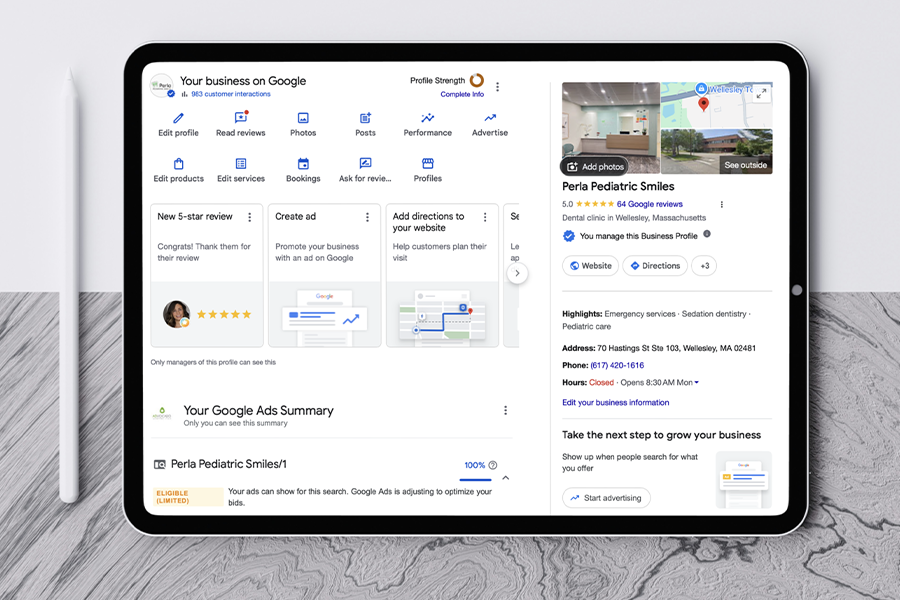
Make it easy to find:
Office addresses
Phone numbers
Hours of operation
Directions or maps
Parking and accessibility information
Accepted insurance plans, when appropriate
Organizations with multiple offices should consider creating a dedicated page for each location. These pages can include the services, providers, hours, photos, and contact information specific to that office.
Location pages are also valuable for local SEO because they help search engines understand the geographic areas your organization serves.
8. Visible Trust Signals
Patients are looking for signs that your organization is credible, experienced, and genuinely cares about the people it serves.
Trust signals may include:
Authentic photos of providers, staff, and facilities
Patient reviews or approved testimonials
Professional memberships
Awards and accreditations
Hospital affiliations
Community involvement
Clear explanations of your approach to care
Whenever patient stories, photos, or testimonials are used, obtain the appropriate permissions and follow your organization’s privacy policies.
Stock photography can help fill occasional visual gaps, but real images make it easier for patients to picture the experience of visiting your office or facility. Even a small collection of professional, authentic photos can make a healthcare brand feel more human.
9. Accessible Design and Content
Healthcare information should be usable by as many people as possible, including visitors with visual, auditory, motor, or cognitive disabilities.
Accessibility considerations include:
Readable font sizes
Strong color contrast
Descriptive alternative text for meaningful images
Proper heading structure
Keyboard-friendly navigation
Clearly labeled forms and buttons
Captions or transcripts for important video content
Plain, understandable language
Accessibility should be considered throughout the design process, not treated as a final checklist item. It supports a better experience for every visitor, including older adults and people using mobile devices. The Web Content Accessibility Guidelines provide helpful standards for making digital content more accessible.
10. Simple, Privacy-Conscious Forms
Appointment and contact forms should ask only for the information needed at that stage of the patient journey.
A complicated form can discourage someone from reaching out. At the same time, healthcare organizations need to be thoughtful about how personal or health-related information is collected, transmitted, stored, and accessed.
Use clear field labels, explain what will happen after submission, and avoid requesting unnecessary sensitive details through a general website form. Your organization’s privacy, compliance, and technology teams should review any tools that collect patient information.
The experience after submission matters too. A confirmation message should tell the visitor whether the request was received, when they can expect a response, and what to do if their need is urgent.
A Better Healthcare Website Starts with the Patient
The best healthcare websites balance strategy, design, technology, and empathy. They help patients feel informed and confident while giving the organization a stronger foundation for search visibility, marketing, and long-term growth. These website essentials are part of a larger healthcare marketing strategy.
At Advocado Marketing Group, we create thoughtful healthcare websites and marketing strategies for medical practices, specialty providers, hospitals, and other healthcare organizations. We bring a fresh perspective to each project while making sure the finished website reflects the organization, supports its goals, and remains easy for patients to use.

Ready to give your healthcare website a fresh start? Contact Advocado Marketing Group to discuss your project.
Frequently Asked Questions
About Healthcare Website Design
-
Every healthcare website should clearly explain the organization’s services, providers, locations, contact information, and next steps. It should also be mobile-friendly, accessible, easy to navigate, and designed to establish patient trust.
-
Healthcare organizations should review important information regularly and update the website whenever providers, services, locations, hours, insurance participation, or patient procedures change. A broader review at least once or twice a year can help identify outdated content, broken links, and usability issues.
-
Separate pages are helpful for major services because they give patients space to understand what is offered and what to expect. They also provide clearer context for traditional search engines and AI-powered search tools.
-
Yes. Clear location information, locally relevant service content, individual location pages, and accurate contact details can improve a practice’s visibility for searches in the communities it serves. A website works best when paired with a complete and actively maintained Google Business Profile.
-
Healthcare website design requires particular attention to patient trust, accessibility, privacy, clarity, and accuracy. Visitors may be making important decisions while feeling worried or overwhelmed, so the experience must be easy to understand and navigate.
Written by Advocado Marketing Group, a Long Island marketing agency helping healthcare organizations build thoughtful brands, websites, and digital strategies.
